Using the Aggregates Page
The Aggregates page displays all aggregate instances and materialized query-based datasets (QDSs) that have been defined for your deployed models. You can view the aggregates and materialized QDSs that have been created, when they were last built, and the attributes or datasets they are based on. For aggregate instances, you can also view their build history.
QDS materialization is a Public Preview feature.
To access the Aggregates page, click Aggregates in the Design Center sidebar.
Definitions tab
The Definitions tab displays all aggregate definitions and materialized QDSs in your system.
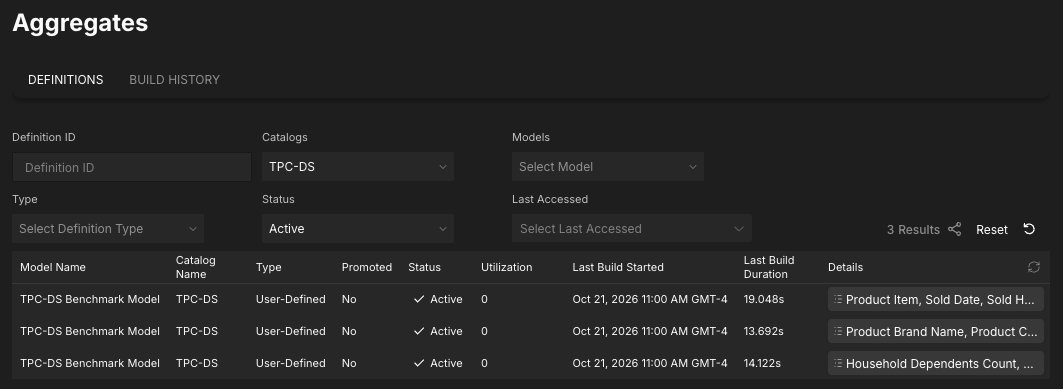
The table contains the following information for each aggregate definition and materialized QDS.
| Field | Description |
|---|---|
| Model Name | The name of the model the aggregate/materialized QDS is defined on. |
| Catalog Name | The name of the catalog the aggregate/materialized QDS is defined on. |
| Type | The type of definition; for example, User Defined, Demand Defined, Materialized Query Dataset. |
| Promoted | For aggregate definitions only. Whether or not the definition is promoted. |
| Status | The status of the aggregate definition/materialized QDS.1 |
| Utilization | For aggregate definitions only. The number of times queries have accessed the aggregate since its inception. |
| Last Build Started | The time at which the last build started. |
| Last Build Duration | The duration of the last build, in seconds. |
| Details | For aggregates, the specific attributes and metrics included in the aggregate definition. For materialized QDSs, the dataset the QDS is based on. |
1Aggregate definitions and materialized QDSs can have the following statuses:
- Active: The definition/QDS is complete and available for queries.
- Building: The definition/QDS is currently being created.
- Cancelled: The definition/QDS was canceled by user request.
- Deleted: The definition/QDS was deleted.
- Failed: The definition/QDS failed.
- Inactive: The definition/QDS is no longer used.
- Invalidated: The definition/QDS was invalidated.
- Paused: The build for the definition/QDS is paused.
- Pending: The definition/QDS is pending.
- Queued: The definition/QDS is in the build queue.
- Rejected: The definition/QDS was rejected.
- Staged: The definition/QDS is complete, but is waiting for a remaining batch to complete before being activated.
- Unavailable: The definition/QDS cannot be accessed.
You can use the fields at the top of the Definitions tab to filter the table; for example, you can filter by definition type or status.
Aggregate Details panel
You can click on an aggregate definition or materialized QDS in the table to open the Aggregate Details panel, which displays additional information about it. The panel displays different details, depending on what you are viewing:
Aggregate definition details
For aggregate definitions, the Aggregate Details panel contains two sections: Instances and Metadata.
The Instances section of the panel lists all instances of the aggregate, including its status, when it was last built, how long the build took, and how many rows it contains.

From here, you can click on an instance to open the instance details panel, which contains more information about that particular instance.
The Metadata section of the Aggregate Details panel contains general information about the aggregate definition.
| Field | Description |
|---|---|
| Name | For user-defined aggregates (UDAs) only. The name of the aggregate. |
| ID | The unique ID associated with the aggregate. |
| Created Date | The date and time the aggregate was created. |
| Status | The status of the aggregate. |
| Data Warehouse | The data warehouse in which the aggregate definition was built. |
| Last Build Started | The date and time the most recent build began. |
| Last Build Ended | The date and time the most recent build ended. |
| Import Date | For imported aggregates only. The date the aggregate was imported. |
| Utilizations (Cumulative) | The total number of queries that have used the aggregate since it was created. |
| Utilizations (Recent) | The total number of queries that have used the aggregate recently. Note: This value may not be current, since the job that updates the recent usage counts runs periodically (three times per day). The value displayed here is not calculated on demand, and it is not recalculated if you refresh the browser. |
| Query Saved Time | The amount of query time saved due to aggregation. |
| Incremental | Whether the aggregate will be incrementally updated. |
| Attributes | The attributes present in the aggregate definition. |
| Metrics | The metrics present in the aggregate definition. |
Materialized QDS details
For materialized QDSs, the Aggregate Details panel contains one section: Metadata. This section provides general information about the materialized QDS.
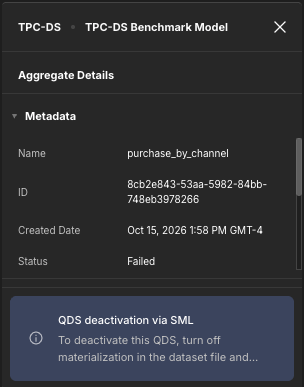
The Metadata section contains the following fields.
| Field | Description |
|---|---|
| Name | The name of the materialized QDS. |
| ID | The unique ID associated with the materialized QDS. |
| Created Date | The date and time the QDS was materialized. |
| Status | The status of the materialized QDS. |
| Data Warehouse | The data warehouse in which the QDS was materialized. |
| Last Build Started | The date and time the last build started. |
| Last Build Ended | The duration of the last build, in seconds. |
| Dataset Name | The name of the dataset the QDS was materialized from. |
Instance details panel
Only available for aggregate instances. The instance details panel contains detailed information about a particular aggregate instance, including its SQL query. You open the instance details panel by clicking on a particular instance in the Instances section of the Aggregate Details panel.

For instances that are not active (e.g., failed, inactive, deleted), the panel also displays information about how it became inactive.

Build History tab
The Build History tab of the Aggregates page displays aggregate builds that have run in your system.

The table contains the following information for each build:
- The name of the catalog and model for which aggregates were built.
- The build status.
- The build start time and duration.
You can filter the builds using the fields above the table.
Build details panel
You can click on a specific build in the table to open the build details panel.

The Instances section of the panel displays all aggregate instances built in that particular build. As with the Aggregate Details panel on the Definitions tab, you can click on each instance to open the instance details panel.
The Metadata section of the build details panel displays information about the build itself, including its batch ID, batch type, and status. For builds that failed, the panel also lists the reason the build failed.

Deactivating aggregate instances and materialized QDSs
You can deactivate active aggregate instances from the Aggregates page by clicking the Deactivate buttons on the Definitions tab and Aggregate Details panel. For more information, see Deactivating an Active Aggregate Instance.
Materialized QDSs, however, can only be deactivated by disabling the Allow QDS Materialization option in the Dataset properties panel and redeploying the model. For more information, see Configuring QDS Materialization for Query-Based Datasets.